Information
in separate places.
 Separate calendarGuest messagesStay notes
Repeated updates, switching accounts and more places to keep in check.

VRBO + NOXIO
A whole home.
A connected stay.
Your villa or vacation home on Vrbo. Reservations, rates and availability in Noxio — connected to the work before and after every arrival.
Your Vrbo account. Your everyday workflow.
 ONE HOME. MANY SMALL DETAILS.New booking
The next stay starts here.
 Calendar

WHY VRBO?
Vrbo has a clear focus: entire homes and self-contained units. Villas, vacation houses and apartments where guests do not share the stay with a host or other guests.
If that describes your property, Vrbo adds a channel built around this kind of stay. Noxio helps that presence fit into your working day.
How your work changesLESS ADMIN BETWEEN STAYS
A date change should not mean finding the same home again in a different system.
Separate calendarGuest messagesStay notesRepeated updates, switching accounts and more places to keep in check.
Vrbo becomes part of the same schedule as your other bookings. See the context and carry on with your work.
Illustrative workflow — not a live reservation. Real Noxio calendar. Personal details have been removed.
VRBO CHANNEL MANAGER + PMS
Open guest and stay context from the reservation stripe. Channel rates and rules share the same operational base: the Noxio calendar.
THE STAY CONTINUES
Before arrival, throughout the stay and after checkout. Keep the guest within a connected working flow.
Illustrative working journey. PMS-linked invoicing requires Pro and an add-on package per tax ID.
03 — 05 · BEFORE AND DURING THE STAY
Receive Vrbo messages in Unified Inbox and reply from Noxio. Keep the conversation, reservation details and useful stay notes together as you prepare for the guest.
Explore Unified Inbox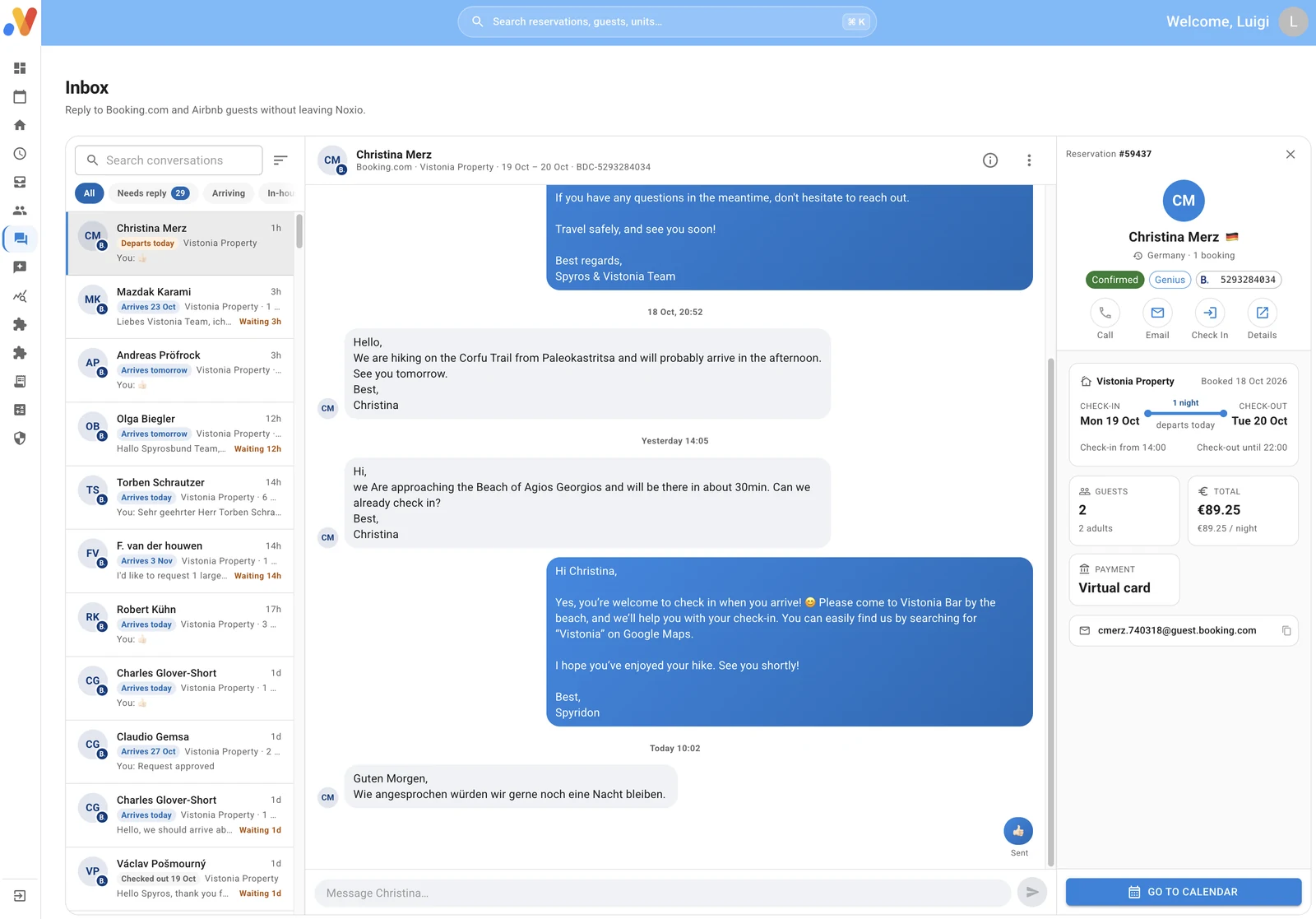
06 — 07 · FOLIO / myDATA
The Folio brings the reservation’s financial context together. Review the details and continue to the document workflow, through a licensed provider to myDATA.
A Noxio workflow, with Pro and an invoicing add-on per tax ID. Explanatory flow.
Explore invoicing08 · REVIEW INBOX
Vrbo reviews arrive in Review Inbox. Read about the guest’s experience and publish your response from Noxio.
Review InboxYour responseIllustrative review workflow.
Explore Review InboxYOUR HOME. YOUR DECISIONS.
Dates, rates and stay rules. You decide for each home; Noxio connects your changes to the channel.
ILLUSTRATIVE EXAMPLESet the Vrbo rate for this home and period. You are not forced to use the same rate across every channel.
An illustrative operator choice, not a product screen or an automatic pricing recommendation.
ILLUSTRATIVE EXAMPLEA three-night gap does not have to sit behind a five-night rule. Choose the dates and adjust your Vrbo Minimum Stay.
An illustrative operator choice, not a product screen or an automatic pricing recommendation.
ILLUSTRATIVE EXAMPLESet arrival and departure restrictions for the unit and dates you choose, around the way your property operates.
An illustrative operator choice, not a product screen or an automatic pricing recommendation.
ILLUSTRATIVE EXAMPLEUse Stop Sell to close Vrbo sales on selected dates while keeping separate choices for your other channels.
An illustrative operator choice, not a product screen or an automatic pricing recommendation.
FLEXIBILITY FOR EACH UNIT
A villa and an apartment do not have to follow the same plan. Set different rates, Minimum Stay and restrictions for each unit and channel, around the way you want to operate.
Synchronization keeps your operations connected. It does not require every rate and rule to become identical.
Explore Channel ManagerILLUSTRATIVE SETTINGSExample units and rules, not real customer data.
MULTIPLE VRBO ACCOUNTS
Connect multiple Vrbo accounts to one Noxio account. Their bookings meet in a shared calendar, while each unit keeps its own rate and availability choices.
Useful even when Vrbo is your only channel.
Account AAccount BShared calendar
SOFTWARE WITH HOSPITALITY EXPERIENCE
For a vacation home, a useful connection starts with the practical needs of the stay. Together, we review your Vrbo distribution, units, rates and restrictions.
The Noxio team guides your setup, discusses practical improvements and remains available when questions arise.
Talk to a specialistTOGETHER FROM THE START
Connect Vrbo to the Noxio PMS with a review of your existing setup and everyday workflow.
Discuss your connectionStart with your account and existing listings. Review how the connection to Noxio will be configured.
Match each Vrbo home to the correct Noxio unit. Review rates, available dates and stay rules.
Check imported reservations and blocked dates, following Vrbo’s specific process for bookings made before connection.
CHANNEL COMMISSION ≠ SOFTWARE SUBSCRIPTION
Vrbo’s current Pay-Per-Booking guidance states a standard 12% commission. Professional Plan rates in some markets, including parts of Europe, may reach 15%.
Payment processing depends on your setup: an external processor may charge separately. Check your exact rate and applicable taxes in your agreement and Vrbo Owner Dashboard.
Official Pay-Per-Booking model ↗
Vrbo software connection guidance ↗
Last checked: 30 Oct 2026. Terms may change.
THE CHANNELCovers your own Vrbo distribution agreement and payment arrangement.
THE OPERATIONSNoxio organizes reservations and daily management. Its subscription is separate from Vrbo’s charges.
See Noxio pricingVRBO IN YOUR CHANNEL MIX
Vrbo brings its whole-home focus. Other channels can add different ways for guests to discover you. Choose where your property fits and keep the operational work together in Noxio.
Channel ManagerYOUR CHANNEL MIX
FAQ
It brings Vrbo bookings into the Noxio calendar and connects rates, availability and stay rules with your everyday operations. Continue from the reservation to guest context, messages and the stay workflow.
Vrbo focuses on entire homes or self-contained units, such as villas, vacation homes and apartments. It is not a directory of individual rooms in spaces shared with a host. Check your own listing’s eligibility with Vrbo.
We can connect your existing account and listings. If you are new to Vrbo, we guide you through the preparation needed and matching your listings to Noxio units.
We match each Vrbo listing to the correct Noxio unit, so bookings, available dates and your changes refer to the right property. Our team reviews the setup with you.
Noxio supports importing existing reservations. During onboarding, we check bookings and blocked dates together. Reservations made before connection follow Vrbo’s specific process; importing them does not itself change their payment or management terms.
Yes. Noxio supports Vrbo rates, Minimum Stay, arrival and departure restrictions, and Stop Sell. Choose the unit and dates and apply your own strategy for this channel.
Yes. Connect multiple Vrbo accounts to one Noxio account and see their units and bookings in a shared calendar. This does not merge the accounts on Vrbo.
Yes. Vrbo guest messages are supported in Unified Inbox, and you can reply from Noxio with the reservation context alongside the conversation.
Yes. Vrbo reviews are collected in Review Inbox. Read them, write a reply and publish your response from Noxio.
Stay charges are organized in the Folio. With Pro and a separate invoicing package per tax ID, continue to document issuance through a licensed provider to myDATA. This is a Noxio workflow, not a Vrbo invoicing service.
As checked on 30 October 2026, Vrbo’s official Pay-Per-Booking page states a standard 12% commission, with different terms in some markets and plans. Professional Plan rates in parts of Europe may reach 15%. Your exact rate and payment-processing arrangement depend on your setup; check the Vrbo Owner Dashboard. Noxio is a separate subscription.
Yes. Vrbo can work alongside Booking.com, Airbnb, Expedia and direct bookings in Noxio. Each channel can keep its own rates and strategy, according to your settings and commercial agreement.
Discover how Noxio can support your business.
See Noxio in action