AIRBNB + NOXIO

Airbnb
with Noxio.

A stay with character.
A workflow that carries on.

Connect your Airbnb listings to Noxio. From the first reservation to the last message, keep the work behind every stay together.

Your listings. Your way of hosting.

Connected
The stay workflow
Real Noxio calendar with a reservation overview
A new stayAirbnb → Noxio Calendar
Availability updated
Illustrative workflow, not live data. Real Noxio calendar · personal details have been removed.

WHY AIRBNB?

Someone is looking
for a stay like yours.

A city apartment. A holiday villa. A home with its own character. Airbnb gives space to different kinds of accommodation and different reasons to travel.

For a host, it is an opportunity to introduce a property to an international audience. Connecting Noxio organizes the work that follows when a search becomes a reservation.

LESS REPEATED WORK

The booking is on Airbnb.
The work does not have to be scattered.

Without Noxio

Another tab.
Another task to remember.

The new booking
Update the calendar
Where was that conversation?
Enter the details again

When tools work separately, you copy details and check again to see what has been updated.

Editorial task illustration, not an Airbnb screen.
With Noxio

One reservation.
Its next step close by.

Real Noxio calendar with a reservation overview
Booking receivedConnected availability
  • Reservations alongside your other stays
  • Rates and rules in the same calendar
  • Details, messages and Folio in one workflow
Real Noxio calendar · personal details have been removed. Illustrative workflow, not live data.

AIRBNB CHANNEL MANAGER + PMS

Into the calendar.
Into your working day.

The new booking, available dates and accommodation share the same view. Open the reservation and continue with guest details, notes or stay charges.

ReservationNoxio Calendar
The real Noxio calendar with an overview of stays
Real Noxio calendar · personal details have been removed. Product overview, not a recording of an Airbnb reservation arriving.

HOSTING CONTINUES

Beyond synchronization.
Through the whole stay.

Airbnb brings the reservation. Noxio connects the everyday work around your guest.

  1. 01Airbnb bookingThe next stay
  2. 02CalendarBooking & availability
  3. 03Guest contextReservation details
  4. 04ConversationMessage & reply
  5. 05HostingPMS & notes
  6. 06FolioThe stay’s charges
  7. 07DocumentProvider → myDATA
  8. 08ReviewReview Inbox

An illustrative working journey. The stages are not one automatic sequence of actions.

BEFORE ARRIVAL

The guest’s question.
Alongside the context for your reply.

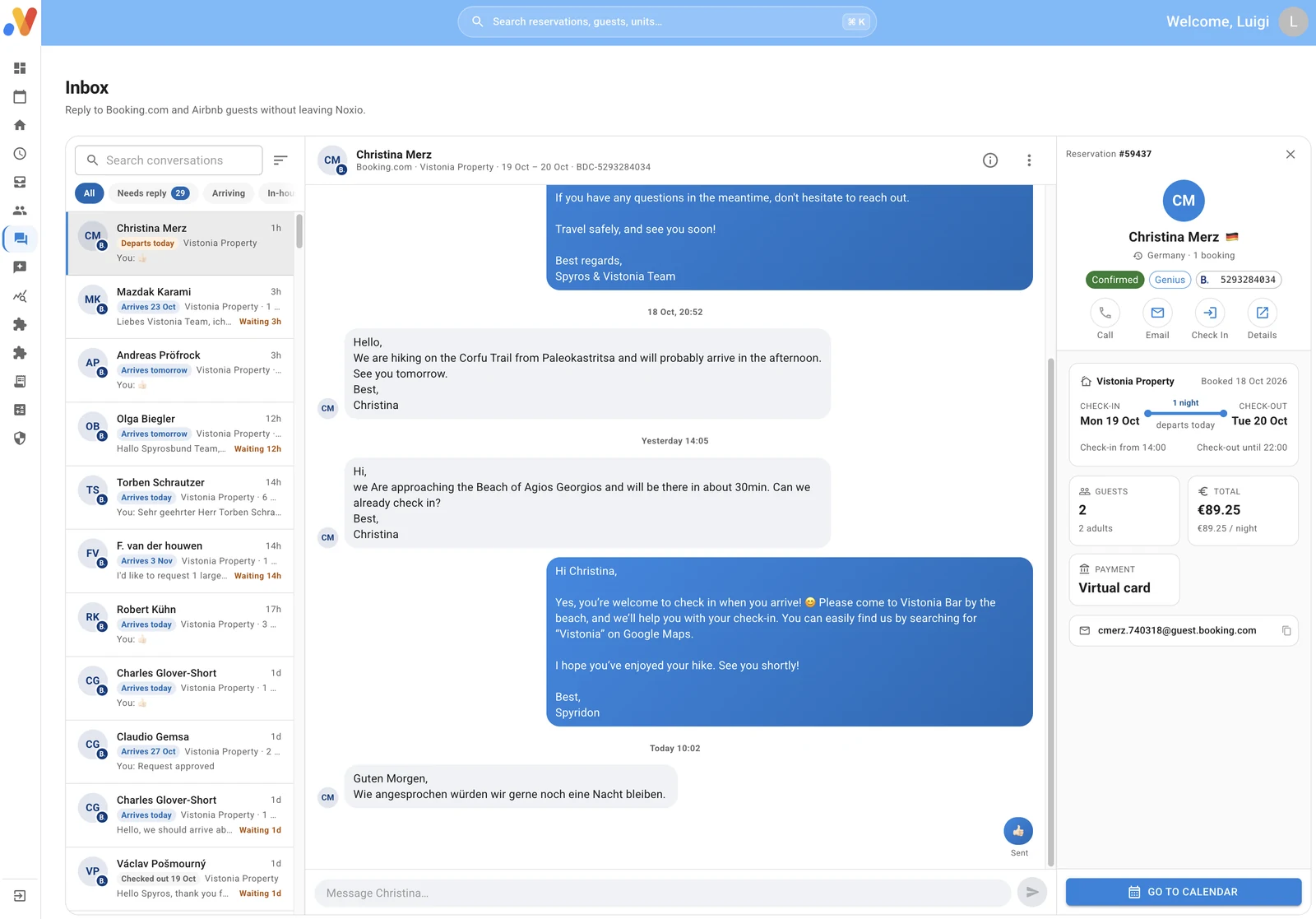
Receive Airbnb messages and reply from Noxio’s Unified Inbox. Keep the conversation close to the reservation, instead of looking up who is arriving and where they are staying.

Explore Unified Inbox
Real Noxio Unified Inbox demo showing a Booking.com conversation
Real Unified Inbox demo with a Booking.com conversation — workspace reference, not an Airbnb capture.
Message + reservation context

From the stay
to the document.

The Folio brings together the stay’s financial context. Continue into Noxio’s document workflow, through a licensed provider to myDATA.

FolioDocumentmyDATA

PMS-linked invoicing requires Pro + a separate invoicing package per tax ID. It is a Noxio workflow, not an Airbnb service.

The invoicing workflow

After checkout,
the conversation continues.

Airbnb reviews are collected in Review Inbox. Read them, reply and publish your response from Noxio. AI assistance and automation are your choice.

Review → ReplyReview Inbox

Illustrative review workflow, with no actual review or rating.

Explore Review Inbox

YOUR AIRBNB STRATEGY

See the gap.
Decide what changes.

Rates, Minimum Stay and restrictions, in the Noxio calendar. The decisions remain yours.

An Airbnb rate.
Based on your own strategy.

Choose the unit and dates, then change its Airbnb rate from Noxio. Your decision can reflect the channel’s costs and the season.

Nightly rate

145 €155 €
Illustrative operator choice · not a product screen or an automatic recommendation.

A short gap.
A stay rule you can adjust.

When two nights are available between stays, adjust Minimum Stay for those dates. The change applies to that unit and Airbnb.

Minimum stay

3 nights2 nights
Illustrative operator choice · not a product screen or an automatic recommendation.

Your dates.
Your stay rules.

Set Airbnb arrival and departure restrictions by unit and period, according to how you organize hosting.

Date restrictions

ArrivalDeparture

Two independent settings

Illustrative operator choice · not a product screen or an automatic recommendation.

Close sales.
For the dates you choose.

Use Stop Sell to close Airbnb sales for a specific unit and dates. Other channels can retain their own strategy.

Channel availability

OpenStop Sell
Illustrative operator choice · not a product screen or an automatic recommendation.
More about Channel Manager

DIFFERENT SPACES. DIFFERENT NEEDS.

An apartment is not a villa.
Its strategy can be different too.

Set separate rates, stay rules and availability for each unit on Airbnb. One choice does not need to be applied identically to every property or channel.

Each unit. Each channel.
Its own strategy.

ApartmentAirbnb · 2 nights
125 €
VillaAirbnb · 5 nights
240 €
Holiday homeSelected dates
Stop Sell
Example properties, rates and rules. Your choices, not pricing recommendations.

MULTIPLE AIRBNB ACCOUNTS

More listings.
One working base.

Managing properties across different Airbnb accounts? Connect them to one Noxio account and see all their units and reservations in the same calendar.

Continue with rates, messages and daily work from there—even when Airbnb is your only channel.

SOFTWARE WITH HOSPITALITY EXPERIENCE

The settings matter.
So do the people beside you.

You get more than a tool. You have people beside you who understand hospitality and help you consider how your listings, rates and stay rules work together.

Talk to a specialist
A moment of hospitality at a Mediterranean property
Hospitality illustration, not a photograph of the Noxio team.

A considered connection

Accounts and listings matched to the right place.

A settings review

Rates, availability and stay rules reviewed with you.

Practical guidance

Discuss choices that fit the way you host.

FROM CONNECTION TO DAILY USE

Set it up together.
Work with a clear starting point.

  1. 01

    Connect your account

    Connect the Airbnb account you already use.

  2. 02

    Map your listings

    Match each Airbnb listing to the correct Noxio unit. This is mapping.

  3. 03

    Review the workflow

    Review imported bookings, availability, rates and rules before continuing your daily work.

See the connection in a demo

Guidance at the start. Support as you continue.

CLEAR ROLES, CLEAR COSTS

Airbnb’s service fee.
Your Noxio subscription.

For hosts using property management software, Airbnb applies a single fee deducted from the host payout. Airbnb lists 15.5% for most hosts; exceptions apply.

Check the exact fee in your account. In Noxio, choose your own Airbnb rate with the channel’s cost in mind. Your Noxio subscription is calculated separately.

Official Airbnb service fees ↗ · Fee update ↗
Checked: 30 Oct 2026. Rates and terms can change.

SINGLE SERVICE FEE15.5%

for most hosts, according to Airbnb

Not one rate for every case. Your account’s terms apply.

BEYOND ONE CHANNEL

More channels.
More opportunities.

Airbnb can be one part of your distribution. Add supported channels for different audiences while keeping reservations in the same daily Noxio workflow.

Channel management in your calendar

FAQ

Your listings.
Your practical questions.

How does the Airbnb–Noxio connection work?

Airbnb remains your listing channel. The connection brings reservations, availability, rates and restrictions into Noxio, alongside messages and reviews for everyday stay management.

Can I connect my existing listings?

Yes. We connect your existing Airbnb account and match each listing to the correct Noxio unit. You do not need to start your Airbnb presence again.

What happens to bookings I already have?

Existing Airbnb reservations are imported when you connect. During the initial check, we review listing mapping and the calendar overview together.

Can I manage more than one Airbnb account?

Yes. Multiple Airbnb accounts can connect to one Noxio account. Their units and reservations appear in the same calendar, while retaining a strategy for each unit and channel.

Are Minimum Stay, restrictions and Stop Sell supported?

Yes. Manage rates, availability, Minimum Stay, arrival and departure restrictions, and Stop Sell from Noxio for your selected units and dates.

Does Airbnb need the same rates as my other channels?

No. Noxio supports different rates and rules for each unit and channel. You set your strategy, taking each channel’s commercial terms into account.

Can I answer Airbnb guest messages from Noxio?

Yes. Receive messages in Unified Inbox and reply from Noxio, with the conversation and reservation context together.

What can I do with Airbnb reviews?

Reviews are collected and stored in Review Inbox. Read them, reply and publish your response from Noxio. AI assistance and reply automation are optional.

What does mapping mean for Airbnb listings?

Each Airbnb listing is matched to the correct Noxio unit so that reservations and settings apply to the right accommodation. Our team guides you and reviews the workflow with you.

Does Airbnb’s old 3% host fee still apply?

Do not assume it applies to a PMS connection. Airbnb uses a single-fee model for hosts using property management software. Check your account’s fee and Airbnb’s current official policy. It is separate from your Noxio subscription.

How does a booking connect to invoicing?

In Noxio, continue from the reservation to its Folio and document workflow. PMS-linked invoicing requires Pro and the appropriate separate invoicing package per tax ID. Transmission to myDATA uses a licensed provider.

Will I get help with connection and settings?

Yes. We work with you on connection, unit mapping and the review of rates, availability and stay rules. We discuss practical improvements to your distribution setup and remain available for your questions.


Simpler management.
Better hospitality.

Discover how Noxio can support your business.

See Noxio in action