EXPEDIA + NOXIO

Expedia
with Noxio.

Global visibility.
Operations in your hands.

Bring Expedia reservations into your calendar. Rates, availability and guest conversations, connected to the way your property works every day.

Shared calendarSetup support from the start
Booking channel
Your operations
Reservation overview in the real Noxio calendar
New Expedia reservationIn the Noxio calendar
Illustrative workflow · not a live connection status. Real Noxio calendar · personal details have been removed.

WHY EXPEDIA?

One stay.
Part of a whole journey.

On Expedia, travellers can explore a stay alongside flights, car hire or a travel package. Your property meets people planning a trip, not just searching for a room.

For a hotel or apartment property, this adds another route to the guest. Noxio brings the operational side of that distribution into your working day.

The Expedia platform ↗

FROM DISTRIBUTION TO DAILY OPERATIONS

The booking comes from Expedia.
What follows comes together in Noxio.

Less switching between systems. More continuity from a rate change to the guest’s arrival.

Without Noxio

Distribution here.
Reception elsewhere.

Partner CentralRates · Availability
Separate calendar
Messages & notes

Reservations to transfer, repeated updates and information you have to look up again.

Editorial task illustration, not Expedia UI.
With Noxio

One reservation.
One connected workspace.

Reservation overview in the real Noxio calendar
Reservation receivedAvailability updated
  • Expedia and other channels in one calendar
  • Rates and restrictions managed in Noxio
  • Reservation details beside your next action
Real Noxio calendar · personal details have been removed. Illustrative workflow · not a live connection status.

EXPEDIA CHANNEL MANAGER + PMS

Distribution matters
when it reaches your calendar.

The new reservation appears alongside your other stays. Open its context to find the guest, reservation details, notes and Folio.

Explore PMS & Calendar
Real Noxio reservation overview
Real Noxio calendar · personal details have been removed. Product overview, not a recording of an Expedia import.
Your next action
starts with the reservation. ↗

Existing Expedia bookings are imported when you connect.

BEYOND SYNCHRONIZATION

From the first reservation
to the review response.

Expedia opens the door to the traveller. Noxio connects the work that follows throughout the stay.

  1. 01ReservationFrom Expedia
  2. 02CalendarConnected availability
  3. 03Guest contextDetails & stay
  4. 04ConversationUnified Inbox
  5. 05StayPMS & notes
  6. 06FolioCharges & checkout
  7. 07DocumentProvider → myDATA
  8. 08ReviewReview Inbox

An illustrative working journey, with actions you control. PMS-linked invoicing requires Pro and an add-on per tax ID.

03 — 05 · THE STAY IN FOCUS

Reply with the guest’s
stay in view.

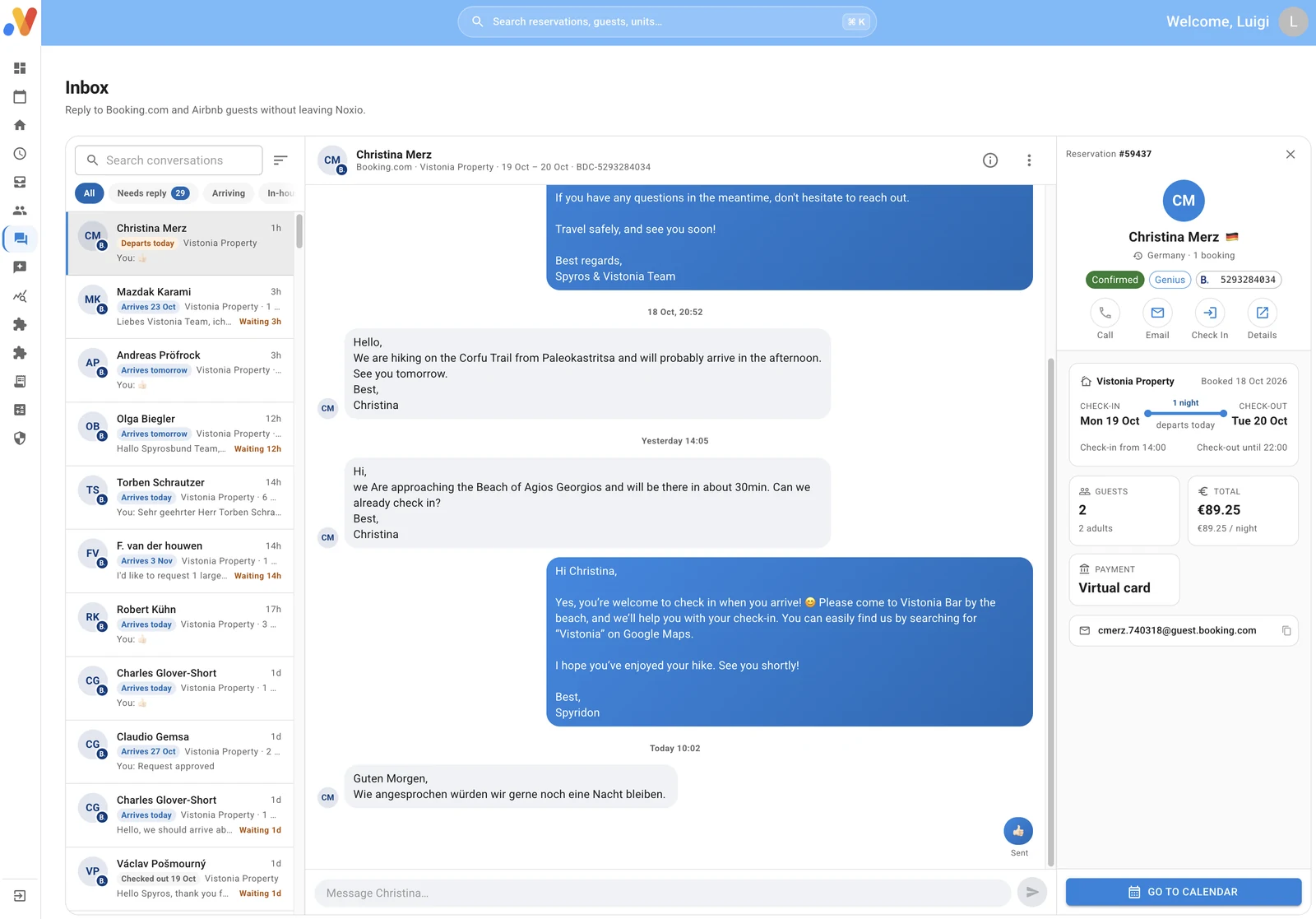
Expedia guest messages arrive in Unified Inbox. Reply from Noxio with the conversation and reservation context together.

During the stay, guest details and notes remain connected to the reservation. Your team can pick up where it left off.

Explore Unified Inbox
Real Noxio Unified Inbox with a Booking.com sample conversation
Real Unified Inbox · approved Booking.com sample, shown as product context.
Unified InboxIllustrative Expedia message flow

06 — 07 · CHARGES & DOCUMENTS

Checkout has
a next step too.

The Folio holds the stay’s financial account. Review charges and details, then continue to the appropriate invoice or receipt.

FolioChargesDocumentProvider → myDATA

Illustrative Noxio workflow through a licensed provider. Pro + an invoicing add-on per tax ID. Separate from the reservation’s payment arrangements on Expedia.

Electronic invoicing / myDATA

08 · REVIEW INBOX

The guest’s experience.
Your response.

Expedia reviews are collected in Review Inbox. Read the feedback, respond and publish your reply from Noxio.

Guest reviewYour response from Noxio

Illustrative flow. AI assistance and automated replies are optional.

Explore Review Inbox

Explore the workflow with your own property in mind.

See Noxio in action

YOUR DISTRIBUTION STRATEGY, YOUR DECISION

Expedia can have
a strategy of its own.

Channel management sits inside your calendar. Choose the unit, dates and change you need.

01 · EXPEDIA

Your Expedia rate is your decision.

Set the rate for the unit and dates you choose, from your calendar. It can differ from your other channels, in line with your commercial agreements.

Unit A · Expedia · Selected datesYour chosen rateIllustrative setting · not a Noxio screen or rate recommendation.
02 · EXPEDIA

A stay length that fits the period.

Manage minimum stays by unit and date. See the available gaps and decide which setting fits your operation.

Unit B · Expedia · Selected datesMinimum Stay · 3 nightsIllustrative setting · not a Noxio screen or rate recommendation.
03 · EXPEDIA

Choose when stays can begin and end.

Arrival and departure restrictions are separate controls. Adjust them for the units and days that need them.

Arrival · DepartureSeparate controlsIllustrative setting · not a Noxio screen or rate recommendation.
04 · EXPEDIA

Close sales when you decide.

Apply Stop Sell on Expedia for the selected unit and dates. You make the decision, with your calendar in view.

Unit C · ExpediaStop Sell · Selected datesIllustrative setting · not a Noxio screen or rate recommendation.
Explore Channel Manager

FROM ONE ROOM TO YOUR WHOLE PORTFOLIO

Each unit. Each channel.
Its own strategy.

A double room and a suite can have different needs. Set rates, Minimum Stay and restrictions by unit and channel, without forcing the same approach on all of them.

Managing more than one Expedia account? Connect them to one Noxio account. Reservations, properties and daily actions come together in a shared calendar.

Illustrative conversation at a Mediterranean property
Hospitality is human work. Illustrative photograph.

SOFTWARE WITH HOSPITALITY EXPERIENCE

The right setup
starts with a conversation.

You get more than a tool. You have people beside you who understand hospitality, and why room structure, rates and rate plans deserve a careful review.

We review your Expedia connection together, discuss your distribution approach and suggest practical improvements based on how your property operates.

Talk to a specialist
01

Connection & mapping

Match Expedia units to the correct Noxio units.

02

Distribution review

Review rates, availability, restrictions and rate plans together.

03

Support that continues

Practical questions and setup changes, with people who know Noxio.

TOGETHER FROM THE START

Connect Expedia.
Start on solid ground.

We start with your existing Expedia setup. You keep your account and commercial agreement.

Let’s look at your setup
  1. 01

    Account connection

    We guide you through connecting Expedia to Noxio.

  2. 02

    Unit mapping

    We check which units match, alongside your rates, restrictions and rate plans.

  3. 03

    Workflow checks

    Existing reservations are imported. We review the calendar overview and connection before you continue your daily management.

THE COST OF DISTRIBUTION

What does
Expedia cost?

Expedia Group receives compensation for reservations. The percentage varies by market and is shared during contracting; there is no single public rate for every property.

For your own cost calculation, check your agreement and business terms in Partner Central. Connecting to Noxio does not change that agreement.

Official Expedia Group partner information ↗
Checked: 30 Oct 2026.

DISTRIBUTION CHANNEL

Your Expedia agreement

Your property’s compensation percentage and commercial terms.

OPERATIONAL SOFTWARE

Your Noxio subscription

A separate software cost. It does not replace Expedia compensation or other agreed charges.

See Noxio pricing

YOUR NEXT DISTRIBUTION STEP

More channels.
More opportunities.

Expedia can be one part of your channel mix. Add supported channels that fit your property and keep their operational work together in Noxio.

See how Channel Manager works

FAQ

Your Expedia integration questions.

What does the Expedia integration with Noxio do?

It connects Expedia reservations, availability, rates and restrictions to your Noxio calendar. Your workflow continues with guest context, messages, PMS, Folio and reviews. Expedia remains the sales channel; Noxio is your daily operational workspace.

Are Expedia and Expedia Group the same thing?

Expedia is a travel platform. Expedia Group is the company behind Expedia and other brands. Distribution through other Group brands or networks follows your property agreement and setup; connecting Noxio does not by itself activate every brand.

Do I need a new Expedia account?

You can connect your existing Expedia setup. Your account and commercial agreement remain yours. The Noxio team guides you through connection and mapping checks.

Can I connect multiple Expedia accounts?

Yes. Multiple Expedia accounts can connect to one Noxio account, with their properties and reservations in a shared calendar. You retain control of rates, restrictions and availability by unit and channel.

What happens to existing reservations?

Existing Expedia reservations are imported into Noxio when you connect. During the initial checks, we review the reservation overview and unit mapping together.

What does unit mapping mean?

It means matching your Expedia units to the correct Noxio units. Together, we review your property structure, rates, availability, restrictions and rate plans so the connection fits your operation.

Are Minimum Stay, arrival/departure restrictions and Stop Sell supported?

Yes. Manage them from the Noxio calendar for the relevant units and dates. Expedia rates and strategy do not have to mirror your other channels, subject to your commercial terms.

Can I receive and reply to Expedia guest messages?

Yes. Receive Expedia guest messages in Unified Inbox and reply from Noxio, with the conversation and reservation context together.

Do Expedia reviews appear in Noxio?

Yes. Expedia reviews are collected in Review Inbox, where you can read them, respond and publish your reply. AI assistance and reply automation are optional.

How does a reservation continue into invoicing?

The Folio brings together the stay’s financial account. With Pro and the invoicing add-on per tax ID, issue the appropriate document through a licensed provider to myDATA. This is a Noxio workflow, separate from how the Expedia reservation is paid.

What commission does Expedia charge?

Expedia Group states that reservation compensation varies by market and is shared during contracting. Check your business terms in Partner Central. Your Noxio subscription is separate and does not replace Expedia charges.

Does Noxio help with connection and initial checks?

Yes. We guide the connection, review your units and key settings together, and discuss practical distribution choices. Support continues after activation.

Can I manage Expedia alongside other channels?

Yes. Connect other supported channels, including Booking.com, Airbnb and Vrbo. Reservations come together in Noxio while each unit’s channel strategy remains yours.


Simpler management.
Better hospitality.

Discover how Noxio can support your business.

See Noxio in action