BOOKING.COM + NOXIO

Booking.com
with Noxio.

More visibility.
Less to manage.

Connect Booking.com to Noxio. Reservations, availability, rates and restrictions, in the calendar you work with every day.

Your account. Our team by your side.

✓ Connected
Your everyday workspace
Real reservation overview in the Noxio calendar
New bookingBooking.com → Noxio · 5 nights
✓ Availability updated
Illustrative connection flow · not live data. Real Noxio calendar. Personal details have been removed.

WHY BOOKING.COM?

Your property.
In front of a global audience.

On Booking.com, travellers search by destination and dates, compare hotels, apartments and villas, and choose based on price, facilities and guest reviews.

For an independent property, this means a presence in an international accommodation marketplace. Noxio brings those bookings into your calendar and everyday workflow.

GLOBAL DISCOVERY
43

languages

For travellers looking for their next place to stay.

≈ 4.7Mproperties on the platform
As of 30 June 2026

Guest reviews add experiences from previous stays to the decision process.

Booking.com ↗ · Booking Holdings ↗
Sources checked: 29 Oct 2026. Visibility does not guarantee bookings.

SAME CHANNEL. A DIFFERENT WORKING DAY.

The channel stays Booking.com.
The work moves into Noxio.

The difficulty is not Booking.com. It is keeping separate systems up to date.

Without Noxio

The Extranet here.
The rest of your work elsewhere.

Extranet
  • Rates & availability
  • Reservations
  • Stay rules
Other channelsNotesCalendar

Separate logins, repeated changes and more opportunities for inconsistencies.

Editorial task representation — not Booking.com UI.
With Noxio

Booking.com,
within the bigger picture.

Real reservation overview in the Noxio calendar
Reservation receivedAvailability updated
  • Reservations in one calendar
  • Connected availability
  • Rates and rules from Noxio
Real Noxio calendar. Personal details have been removed. Illustrative connection flow · not live data.

FROM THE CHANNEL TO THE RESERVATION

Your Booking.com reservation arrives
where you already work.

See the stay alongside your other reservations. Open its context from the booking stripe and carry on with your day.

ReservationNoxio CalendarDetails · Folio · Notes
Real Noxio calendar showing reservations and dates
Real Noxio calendar. Personal details have been removed. Product overview, not a recording of a new booking arriving.

The booking is the beginning.
The calendar is what comes next. ↗

And existing bookings? They are imported at the first connection.

Explore PMS & Calendar

THE BOOKING IS JUST THE BEGINNING

The booking comes through Booking.com.
The journey continues in Noxio.

From the first booking to your next reply. The channel brings the guest; Noxio keeps your work connected throughout the stay.

  1. 01BookingBooking.com
  2. 02CalendarAvailability
  3. 03Guest contextStay details
  4. 04ConversationUnified Inbox
  5. 05StayPMS · Notes
  6. 06CheckoutFolio · Charges
  7. 07DocumentProvider → myDATA
  8. 08ReviewReview Inbox

An illustrative working journey. PMS-linked invoicing requires Pro and an add-on package per tax ID.

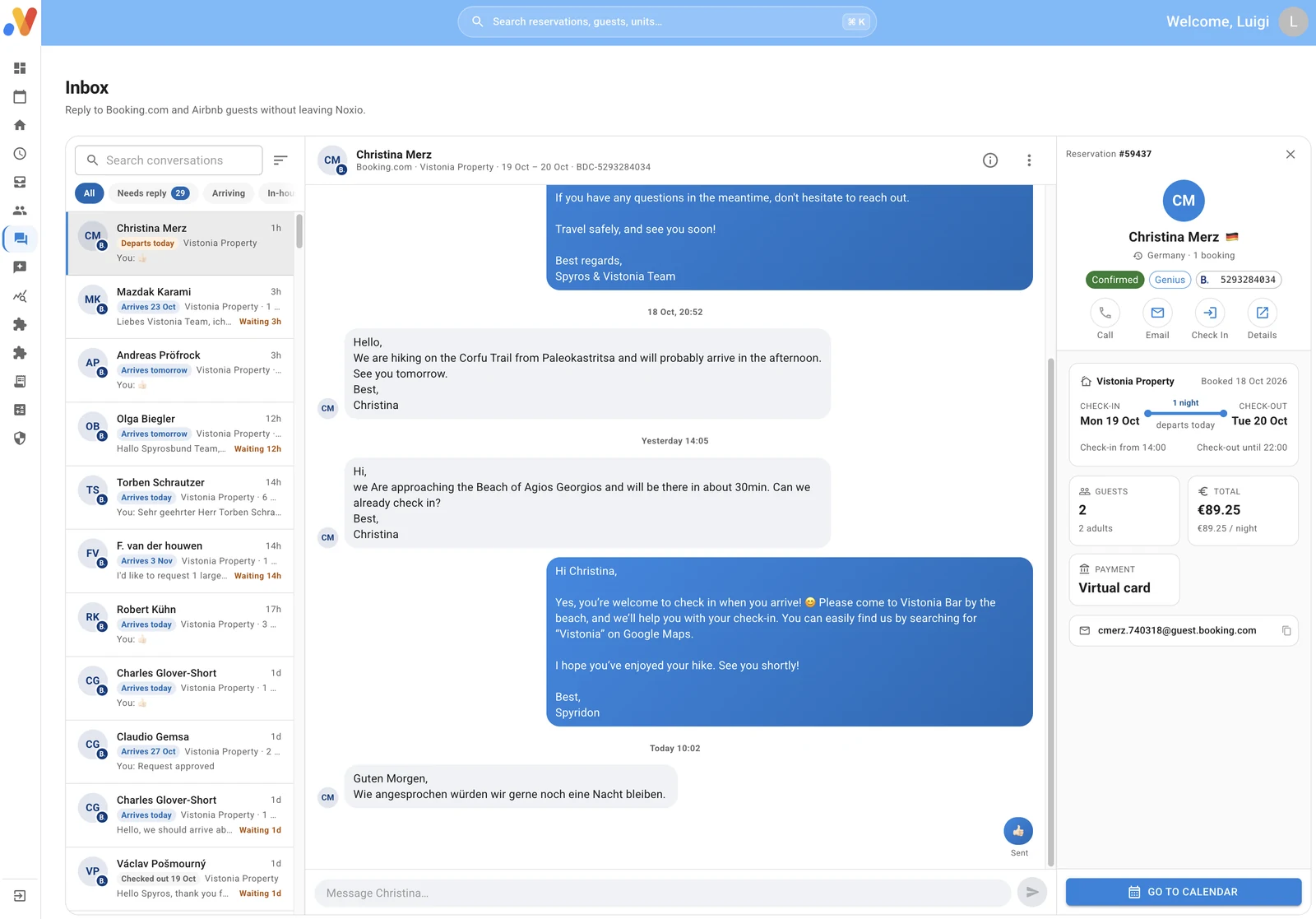
Real Noxio Unified Inbox showing a Booking.com conversation and reservation context
Real Unified Inbox · approved demo data.
Booking.com → Unified InboxMessage + reservation, together

03 — 05 · THE GUEST IN CONTEXT

A booking is more
than dates.

Guest information, stay details and notes sit in the reservation context. Booking.com messages arrive in Unified Inbox, and you reply from Noxio.

Guest messageYour reply
Explore Unified Inbox

06 — 07 · CHECK-OUT

From the stay
to the document.

Stay charges come together in the Folio — the stay’s financial account. Review the details and continue to the appropriate document.

FolioStay chargesReview details
Invoice / ReceiptIssue documentLicensed providermyDATA

Explanatory workflow with Pro and an invoicing add-on per tax ID.

Explore invoicing / myDATA

08 · AFTER THE STAY

The relationship continues
after checkout.

Booking.com reviews are collected in Review Inbox. Read the feedback, respond and publish your reply from Noxio.

Guest review↓ Review Inbox↳ Your response

Illustrative review workflow.

Explore Review Inbox

One booking. A connected set of tools for what comes next.

See Noxio in action

CHANNEL MANAGEMENT, INSIDE THE CALENDAR

See what needs attention.
Act right where you are.

Different dates. A different decision.

Choose the unit and dates, then adjust its Booking.com rate where you can see reservations and the available period.

Period rate
145 €129 €
Illustrative rates — your decision, not a result or system recommendation.

See the gap. Change the rule.

A two-night gap, but a three-night Minimum Stay? You can change it to two for that period on Booking.com.

Minimum stay
32
Illustrative two-night gap. You make the change.

Dates change. Your rules can follow.

Set arrival and departure restrictions for your selected dates. Shape stay patterns around the needs of your property.

Selected dates
Arrival restrictionDeparture restriction
An explanation of available controls, not a settings screen.

Close one channel. Keep your options.

Stop sales on Booking.com for the selected unit and dates without imposing the same strategy on your other channels.

Booking.com
OpenSTOP SELL
Illustrative distribution choice. You control each channel separately.

You choose the unit, channel and dates. These examples explain the actions; they do not simulate the settings screen.

ONE CHANNEL. ITS OWN STRATEGY.

Connected does not mean identical.

Each room, studio, apartment or villa can have its own Booking.com rate, Minimum Stay and rules. See a gap, a cancellation or weaker demand, and decide what to change.

Each unit. Each channel.
Its own strategy.

Your Booking.com choices do not have to match Airbnb, Expedia or Vrbo.

Explore the Channel Manager
Your choices
Unit APeriod rate 145 €Minimum Stay 3
Unit BPeriod rate 129 €Minimum Stay 2
Unit CSelected dates Stop Sell

Illustrative prices and settings, not Noxio recommendations. Each channel’s commercial terms still apply.

Illustrative hospitality conversation at a Mediterranean property
Hospitality starts with people. Illustrative photograph.

SOFTWARE WITH HOSPITALITY EXPERIENCE

More than a tool.
Hospitality experience by your side.

The Noxio team understands property operations. We connect together, review your setup and discuss how it can serve your business better.

Talk to a specialist
  1. 01

    Connection

    We guide you through connecting your existing Booking.com account and mapping your accommodation.

  2. 02

    Setup review

    Together, we review unit mapping, rates, availability, restrictions and rate plans, and check that the connection is correctly set up.

  3. 03

    Practical advice

    We discuss improvements to your sales and management approach, based on your property’s needs.

  4. 04

    Ongoing support

    When questions come up, you can speak with people who understand hospitality and Noxio.

TOGETHER, FROM THE START

How to connect
Booking.com.

You do not need to figure it out alone. Our team guides you through the connection and initial checks.

Connect Booking.com with Noxio
  1. 01

    Connect your account

    We start with your existing Booking.com setup.

  2. 02

    Accommodation mapping

    We match Booking.com units to the corresponding units in Noxio and review your rate plans together.

  3. 03

    Check the workflow

    Existing bookings are imported into Noxio. We check the connection so you can continue from your calendar.

CLEAR ROLES. A CLEARER PICTURE.

What does
Booking.com cost?

Booking.com charges accommodation partners commission. Your percentage is stated in your agreement — there is no single rate for everyone.

Visibility programmes such as Preferred Partner can involve higher commission. Check your own agreement and the terms in your Extranet.

Official commission information ↗
How Booking.com works ↗
Last checked: 30 Oct 2026.

DISTRIBUTION

Channel commission

Commission and programme terms follow your Booking.com agreement.

OPERATIONS

Management software

Your Noxio subscription is separate. It does not replace the channel’s charges.

See Noxio pricing

BEYOND BOOKING.COM

More channels.
More opportunities.

More channels give different travellers more opportunities to find you. You do not have to rely on one source of demand. Choose your mix and manage it inside Noxio.

AirbnbExpediaVrboAdd them when you are ready.

FAQ

Before you connect Booking.com.

What does connecting Booking.com to Noxio do?

It brings Booking.com reservations and the management of availability, rates and restrictions into Noxio. Booking.com remains your sales channel. Noxio is your everyday operational workspace.

Do I need a new Booking.com account?

Not to connect an existing property. We connect your existing account and map the accommodation to Noxio. Your Booking.com account and commercial agreement remain yours.

Can I connect multiple Booking.com accounts to one Noxio account?

Yes. Connect multiple Booking.com accounts or Extranets to one Noxio account and see their properties and bookings in one calendar. Manage rates, availability, restrictions and the stay workflow from Noxio, even if Booking.com is the only channel you use.

What is mapping?

It matches your accommodation or units on Booking.com with the corresponding units in Noxio. Our team helps you and reviews rates, availability, restrictions and rate plans with you.

Can I reply to Booking.com guest messages?

Yes. You receive Booking.com guest messages in Unified Inbox and reply from Noxio, with the conversation and reservation context together.

What happens after checkout?

The Folio holds the stay’s financial context. With Pro and the appropriate invoicing add-on per tax ID, continue to invoice or receipt issuance through a licensed provider to myDATA. Booking.com reviews are collected in Review Inbox, where you can reply and publish your response.

What happens to existing bookings?

Bookings already in Booking.com are imported into Noxio at the first connection. During the initial review, we check the reservation overview and accommodation mapping together.

What information is synchronized?

Reservations, availability, rates and supported stay restrictions. Connecting does not mean that every listing field transfers or that every update completes instantly.

Can I change rates, Minimum Stay and Stop Sell?

Yes. From the Noxio calendar you manage Booking.com rates, Minimum Stay, arrival and departure restrictions, and Stop Sell for the relevant accommodation and dates. You decide what to change.

Do all channels have to use the same rates?

Noxio supports a separate strategy for each unit and channel. You can set Booking.com-specific rates and rules, taking account of your own commercial agreement with each channel.

How much commission does Booking.com charge?

There is no single percentage for every property. Check the rate in your own agreement and Extranet. Some visibility programmes have additional commercial terms. Booking.com commission is separate from your Noxio subscription.

Will you help me connect?

Yes. We work with you on connection and accommodation mapping, review rates, availability, restrictions and rate plans, and discuss practical improvements. Our team is available for your questions.

Can I also connect Airbnb, Expedia or Vrbo?

Yes. These supported channels can become part of the same Noxio workflow. Each connection retains its own capabilities and settings.


Simpler management.
Better hospitality.

Discover how Noxio can support your business.

See Noxio in action